Corporate vs non-corporate: a fairer way to measure productive time
Name only the tools that are the job, count everything else anonymously at team level, and decide which is which on the machine before anything is uploaded. Why this one design choice changes the whole conversation.
Most employee productivity tools start from a complete record and then offer to hide parts of it. Every window, every site, every person, stored, with a privacy setting somewhere that filters what the supervisor sees. The data is all there; the question is who gets to look.
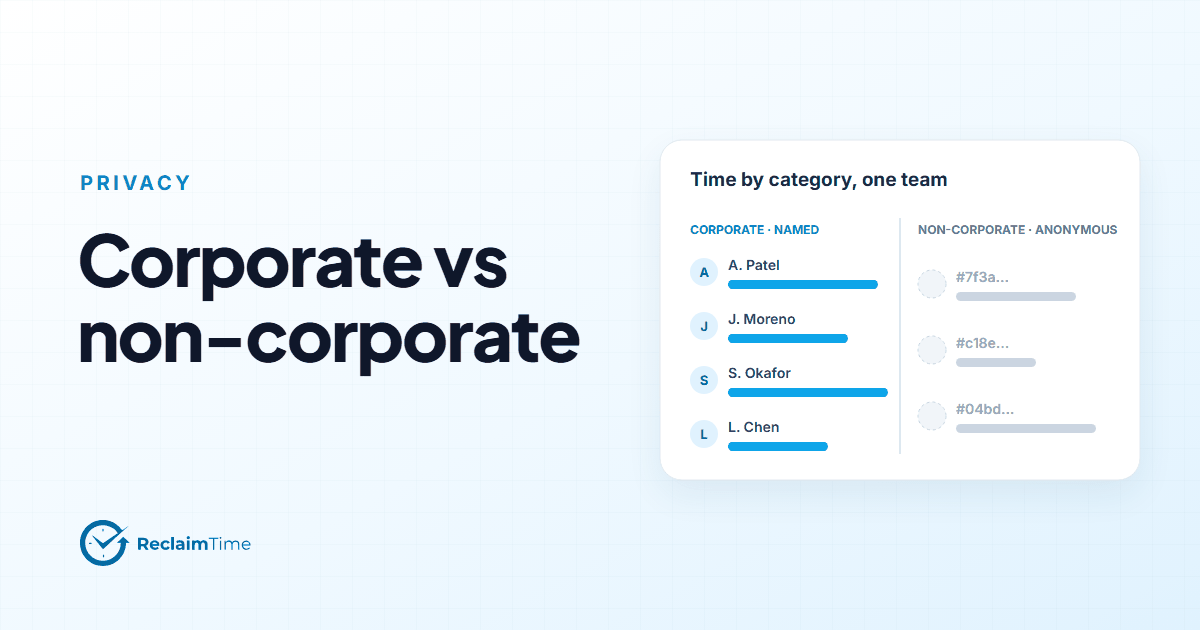
ReclaimTime does the opposite, and I think the difference is the single most important design decision in the product. The organization lists the applications and websites that count as work. Time in those is recorded under the person's name. Time in everything else is recorded against a random identifier, so it is counted for the team but cannot be traced to an individual. And the decision is made on the person's machine before the row is uploaded, so the identifiable version of the non-corporate row never exists anywhere.
This post is about why that is fairer, and why it is still useful.
The two questions an operation actually has
Strip away the dashboards and there are two questions behind any request for productivity data.
The first is are we spending the day on the job? That is a question about the tools of the job: the CRM, the ticketing system, the knowledge base, the telephony client, the spreadsheets and documents that the work lives in. It is an entirely reasonable question for an employer to ask about an individual, because the answer is the job.
The second is how much of the day is going somewhere else, and is that changing? That is a question about everything that is not the job. It matters at team level: a team whose non-corporate time doubles after a system change is telling you something about the system. It does not need to be answered per person to be acted on, and answering it per person is where monitoring turns into surveillance.
A corporate list separates the two questions cleanly. The first gets named data, because the job is not private. The second gets anonymous data, because the rest of a person's screen is.
Why "anonymous at team level" is enough
The objection I hear is that the anonymous half loses information. If you cannot see who was on which site, how do you manage it?
The answer is that you were never going to manage it that way, or if you were, you should not. Consider the actual uses of the non-corporate number.
- Scheduling. Non-corporate time that clusters in one hour across the team is a shift design signal. You fix the schedule for the team.
- Tooling. A spike in non-corporate time after a new system rolls out usually means people are routing around it. You fix the system.
- Culture. A team whose non-corporate share is persistently high has a team-level issue, which the team lead addresses with the team.
- Individual conduct. Where there is a genuine conduct concern about one person, the appropriate process is not a productivity dashboard. It is a conversation, and if necessary an HR process with its own safeguards. Using an aggregate monitoring tool as the evidence base for that is exactly what works councils, data protection regulators and most employment lawyers will tell you not to do.
So the per-person version of the non-corporate data has one use, and it is the one use you are advised against. Not collecting it costs nothing you should want.
Why "decided on the machine" matters
There is a weaker version of this idea where everything is uploaded and the dashboard hides the non-corporate rows unless an administrator unlocks them. It looks similar on screen. It is not similar in any way that matters to a data protection assessment.
If the complete record exists on a server, then it exists for a breach, for a subject access request, for a change of policy by a future administrator, and for a legal demand. The privacy of the non-corporate half rests on a permission setting.
If the row is anonymized on the machine before upload, the identifiable version was never created. There is nothing to breach, nothing to unlock, nothing for a later administrator to turn on. The organization can tell its people, honestly, that it does not hold a record of their non-work screen time, rather than that it has chosen not to look.
This is the version of "privacy by design" that the phrase was meant to describe: a decision in the architecture, not a toggle in the settings.
What the corporate list looks like in practice
The list is maintained by an enterprise administrator in the dashboard. Entries are applications (by name) and websites (by host). It can be imported from a CSV, which is how most organizations start: export the application inventory from the service desk, mark the ones that are the job, import.
A few practical observations from organizations that have run this for a while:
The list is shorter than you think. Most jobs live in a handful of applications and sites. The long tail of the inventory is utilities and one-offs that do not need to be on the list.
It needs an owner. New tools arrive. If nobody adds them to the list, their time shows up as anonymous non-corporate time and the team's number drifts upward for no real reason. Reviewing the list quarterly, or whenever a new system launches, is enough.
Some things are deliberately left off. Team chat is the common example. It is work, mostly, but some organizations choose to leave it off the list so that nobody's chat time is attributed to them by name. That is a choice the list makes available; the tool does not force it either way.
An organization with no list gets named data for everything. That is the default when nothing has been configured, and it is worth saying plainly, because "we have not set up the corporate list yet" is the same as "we are recording everything by name." Set it up before the first wave, not after.
What people are told
The strongest argument for this design is that it can be explained to the people being recorded in two sentences, and the sentences are true.
"The system records how long you spend in the work applications, by name, during working hours. Time in anything else is counted for the team as a whole and is not linked to you."
Try writing the equivalent two sentences for a tool that captures everything and filters later. You will find yourself writing about permissions and policies, and the people reading it will notice.
If you are weighing tools, the question to put to each vendor is the one in the title of this post: can it distinguish corporate from non-corporate use, and where is that decision made? The concepts page on corporate targets in our documentation describes how ReclaimTime does it in enough detail for a data protection officer.
See this on your own teams
Start with a pilot group and see the first team reports within a week. A reply comes within one business day.