Employee monitoring without screenshots: what a works council will accept
Screenshot tools fail works council review for a reason. Here is the data-minimization case, field by field, and the checklist to bring to the consultation.
If you run operations in Germany, Austria, the Netherlands or France, you already know the shape of this conversation. You want to understand where the working day goes. The works council wants to know what, exactly, will be recorded about each person, who can see it, and why a less intrusive option would not do. Both sides are right to ask, and the conversation goes badly when the vendor's answer is "everything, but you can turn some of it off."
This post is the version of that conversation I would want to have as the employer. It is written from how ReclaimTime actually works, but the principles apply to any tool you are evaluating.
Why screenshot tools fail the review
Works councils in Germany have a co-determination right over technical systems that can monitor performance or behavior (section 87(1) no. 6 of the Works Constitution Act, the BetrVG). Elsewhere in the EU the mechanism differs but the test is the same: is the processing necessary and proportionate for the stated purpose, and is there a less intrusive way to achieve it?
A screenshot is almost impossible to defend under that test. It captures whatever is on screen: a private message that popped up, a colleague's payslip open in a shared mailbox, a customer's medical note. The employer did not need any of that to learn that an agent spent forty minutes in a spreadsheet instead of the CRM. The intrusion is total and the purpose was narrow, so the proportionality argument collapses before it starts. Keystroke logging has the same problem in a more acute form: it records passwords.
The data-minimization principle in GDPR Article 5(1)(c) says personal data must be "adequate, relevant and limited to what is necessary." The practical question for the consultation is therefore not "monitoring, yes or no" but "which fields, and can each one be justified?"
The field-by-field case
Here is what the ReclaimTime client records for each window session, and the justification I would give for each field.
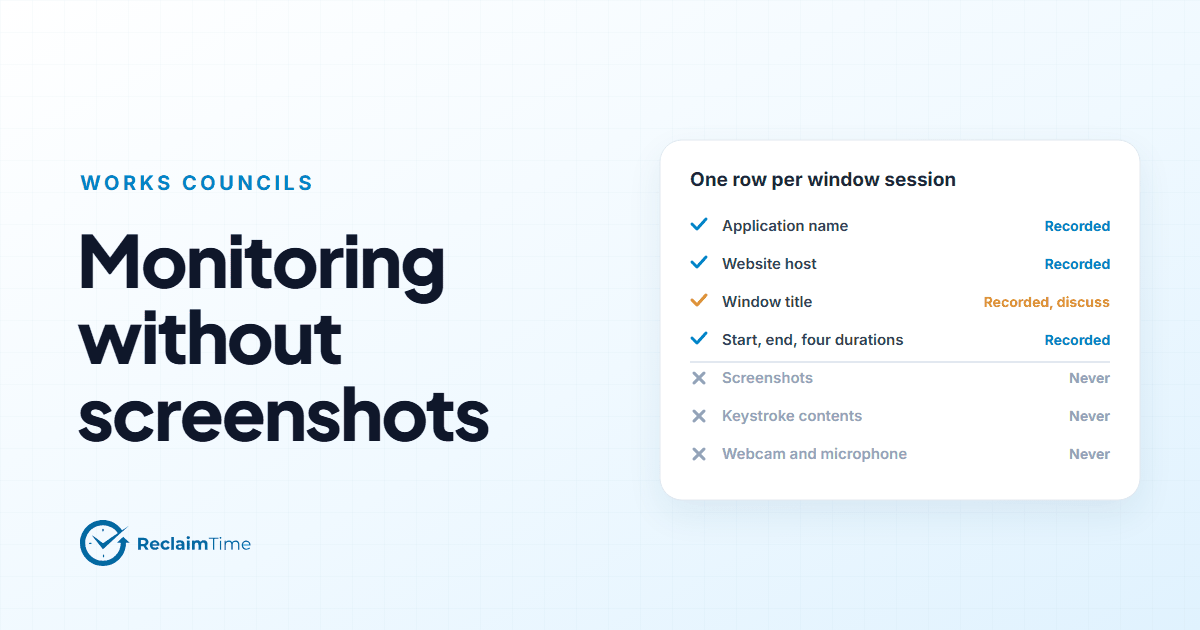
Application name. Which program was in the foreground, for example Microsoft Teams or Excel. This is the core of the purpose: knowing whether time went into the tools the job requires. Without it there is no productivity picture at all.
Website host. For browser windows, the site, for example example.com, not the full address. The host is enough to tell a knowledge base from a video site. Full URLs are off by default and are only switched on for an organization at its own request, because a full URL can contain a search term or a ticket number that the host does not.
Window title. The title bar text. This is the one field I would spend time on in the consultation, because a title can carry a document name or an email subject. It is also the field that makes the data useful at a practical level: "Excel" tells you less than "Excel: Q3 schedule." I have written a separate post on window titles because they deserve it. If the council will not accept titles, that is a conversation to have with the vendor before signing, not after.
Start and end time, and four durations. When the session ran, and how long the window was focused, visible, in use for typing, and in a meeting. Typing is measured as a count of seconds, never as the keys pressed. The durations are what turn a list of windows into a day you can understand.
Account, or an anonymous identifier. Which person the row belongs to, or, for non-corporate activity, a random identifier that cannot be traced back. More on that below.
Machine record. Operating system, make and model, computer name. Recorded once per installation, needed for support and version tracking.
That is the complete list. It should be short enough to put on one slide.
What is never collected, and why that matters more than the list above
A works council will ask what the tool can do, not only what it is configured to do today, because configurations change and councils are around for a long time. So the useful commitments are the ones that cannot be switched on by a setting.
For ReclaimTime that list is: no screenshots or screen recording, no keystroke contents, no clipboard, no camera or microphone, no file contents or paths, no email, chat or call contents, no location, no passwords. None of these capabilities exist in the client, so there is no setting to argue about.
Ask any vendor for the same list in writing. If the answer is "those features are available but disabled," you are negotiating a configuration, and configurations drift.
Two boundaries that do most of the work
Two design choices carry most of the proportionality argument.
Working hours only. Nothing is recorded outside the days and hours configured for the organization or the person. An agent who checks a personal account on the work laptop at 9 pm is not in the data at all. This boundary is easy to explain and easy to verify.
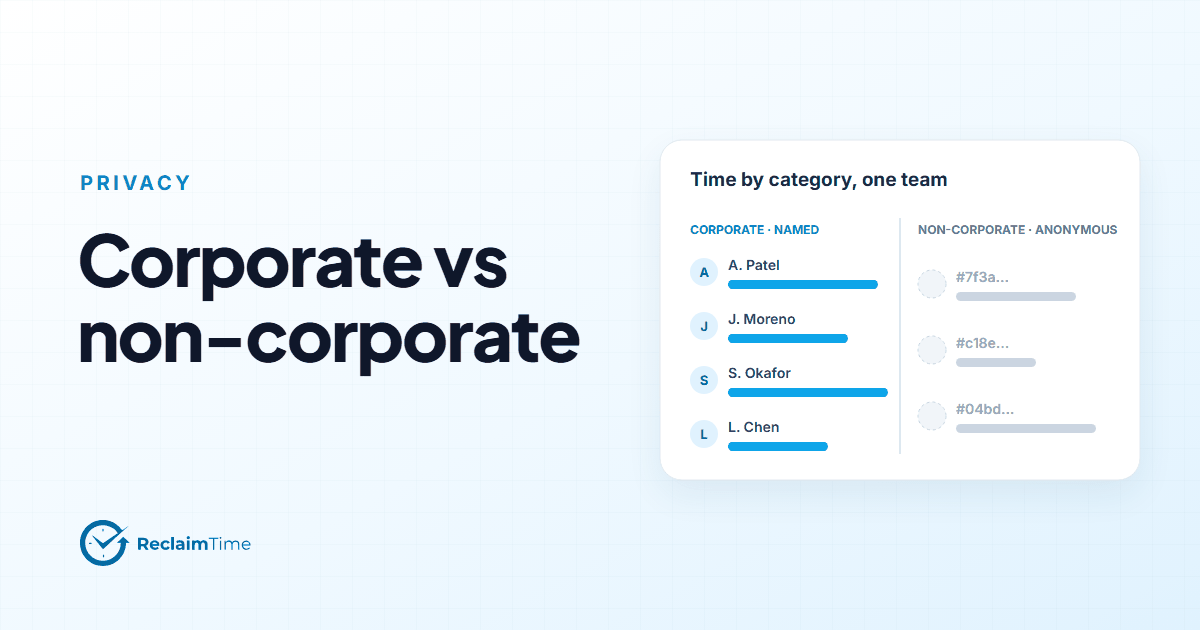
The corporate list. The organization lists the applications and websites that count as work. Time in those is recorded under the person's name. Time in anything else is recorded against an anonymous identifier, so it counts at group level (the team spent this many hours on non-corporate sites) but cannot be traced to an individual. The decision is made on the machine before anything is uploaded, not by filtering a complete record afterwards.
That second point is the one councils respond to, in my experience. It means the employer can answer the legitimate question (how much of the team's day is going somewhere other than work) without ever holding a per-person record of what the somewhere was.
The checklist for the consultation
Bring these, filled in, to the first meeting rather than the third.
- Purpose, in one sentence. For example: to understand how working time is distributed across the tools of the job, at team level, so that staffing, training and tooling decisions can be made on evidence.
- The field list, with a justification for each field and the "never collected" list, both in writing from the vendor.
- Who sees what. In ReclaimTime a supervisor sees their own groups and everything below; an enterprise administrator sees the organization. Say who those people will be.
- Working hours configuration, per site or per person, and who is allowed to change it.
- The corporate list, or at least the principle, and who maintains it.
- Retention. How long rows are kept and when they are deleted. Get the commitment in writing from the vendor rather than assuming a default.
- The data processing agreement, naming the employer as controller and the vendor as processor. ReclaimTime's is on this site.
- What employees will be told, and how. The client has no window to look at in locked mode, so the information has to come from the employer. A one-page notice is enough.
- How the data will not be used. Councils want to hear this one said out loud: not for individual disciplinary action without a separate process, not for league tables.
What this looks like in practice
A consultation that starts with the field list and the two boundaries tends to be short. The council's questions move quickly from "what are you recording" to "who maintains the corporate list" and "what happens to the data of someone who leaves," which are good questions with concrete answers.
A consultation that starts with a product demo of heat maps and productivity scores tends to be long, because every screen raises a question the presenter cannot answer in writing.
If you are preparing for one, our security and privacy page has the field list and the "never collected" list in a form you can hand over, and the data collected page in the documentation has the same material with the notes a data protection officer will want.
See this on your own teams
Start with a pilot group and see the first team reports within a week. A reply comes within one business day.