Nesting new hires: a focus policy that relaxes as they go live
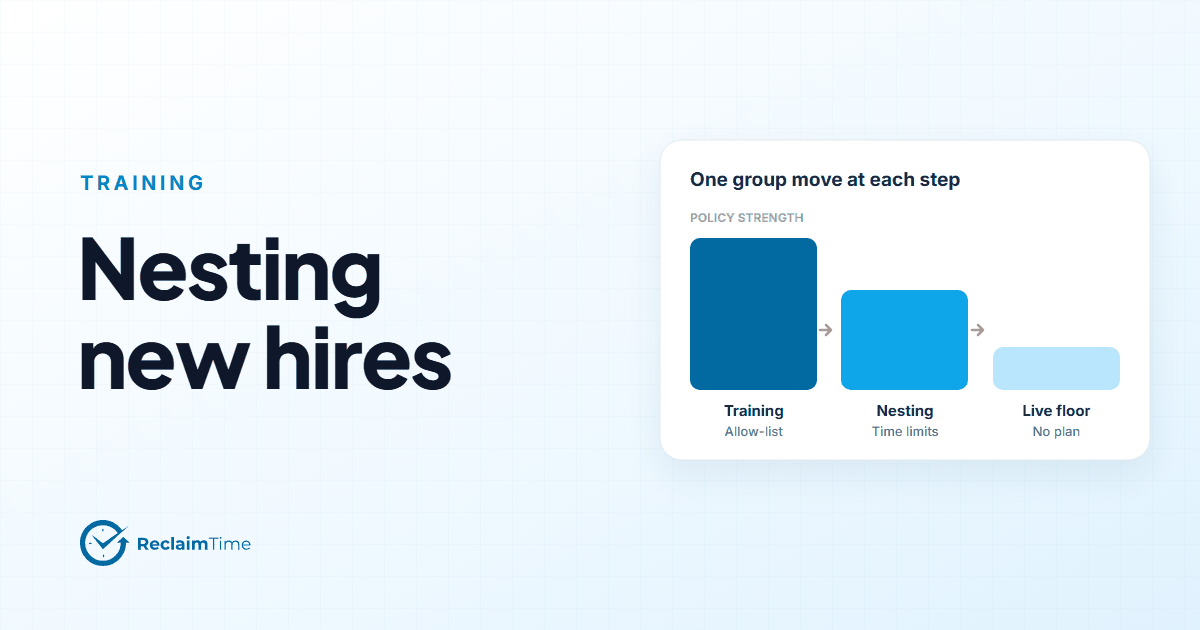
An allow-list during classroom training, a time-limited plan in nesting, full access on the live floor. One group move at each step, and the data to show the transition is working.
New-hire attrition in a contact center is highest in the first ninety days, and most of the levers for it are in training and nesting: how fast people become confident in the tools, how much support they get on their first live contacts, and whether the environment helps them concentrate while they are still learning. Desktop policy is a small lever next to a good trainer, but it is a cheap one, and it is the one this post is about.
The idea is simple. A new hire's desktop policy should be tightest in the classroom, looser in nesting, and gone on the live floor, with each step being a single group move in the dashboard rather than a reconfiguration.
Three groups, three plans
Set up three groups under each site: Training, Nesting, and the live team or teams. Assign a plan to the first two. The live teams get no plan, or the same light-touch policy as everyone else.
Training: allow-list. During classroom training the goal is to learn the CRM, the knowledge base, the telephony client and the learning platform. An allow-list plan permits only those applications and sites and blocks everything else, with the notify option on so people see why a tab closed. The trainer says it once, on day one: "Everything else is unavailable during training. It opens up when you move to the floor."
This is the one place I would use an allow-list rather than a block list. A block list is a guess about what will distract; an allow-list is a statement of what the course needs. Trainers already know the second list, and it is short.
Nesting: time limits, not blocks. In nesting, people are taking live contacts with support. They need the full toolset, and they also need to build the habit of staying in it. Replace the allow-list with a plan that keeps the tools open but puts a daily time limit on the sites that eat time, with the notify option on so the person is told when the limit is reached. The plan should be visibly lighter than training; the direction of travel is the point.
Live: no plan. When someone moves to a live team, the policy goes. They are a colleague now, under the same conditions as the person next to them. If a problem shows up later, it is handled as a problem, not as a return to nesting.
Why a group move, not a settings change
Plans are assigned to groups in ReclaimTime, and a person's policy is whatever plans apply to their groups. So "graduating" from training to nesting is moving the person from one group to the other, which is a thing a trainer or a team lead can do in a few seconds, and it changes the policy, the reporting line and the supervisor's view at the same time.
That matters for two reasons. It keeps the policy change from needing an administrator, so it happens on the day the person actually moves rather than the day the ticket is processed. And it means the data follows the move: the nesting group's statistics are the statistics of the people currently in nesting, which is what the training manager wants to see.
The data that shows the transition is working
Here is where the policy pays for itself. With the three groups in place, the statistics page can show, for each cohort:
- Time in the knowledge base per day in nesting. This should fall week on week as people learn. A cohort where it does not fall is a cohort with a knowledge gap, and the training manager knows it before the quality scores say so.
- Time in the CRM relative to the telephony client. In training this is lopsided toward the CRM by design. In nesting it should converge toward the live floor's ratio. The gap between the nesting ratio and the live ratio is a measure of how close the cohort is to ready.
- Non-corporate time, anonymous, by group. Training should be near zero because of the allow-list. Nesting will be low but not zero because of the time limits. Live will be whatever the floor's number is. A nesting cohort whose number jumps in week three is a cohort that got bored, which is a signal about the nesting content, not about the people.
- Meeting time. Coaching sessions in Teams show up as meeting time. A nesting cohort with very little of it is a cohort that is not getting the support the plan promised.
None of these numbers names a person. They describe the cohort, which is what the training function manages.
Things to decide before the first cohort
Who maintains the allow-list. The trainer. It changes when the course changes, and a trainer who cannot add a site to the list will stop using the list.
What people are told. Explain the plan in the voice of the trainer, not the IT department. People in training are anxious enough.
How long nesting lasts. The plan has no idea. Someone has to move the group, and the easiest way to make sure it happens is a calendar entry per cohort on the day nesting ends.
Whether to tell people the policy relaxes. Yes. "Training is locked down, nesting is lighter, the floor is open" is motivating. A policy that just appears and then just disappears is confusing.
What happens to someone who struggles. Not a return to the training group. The policy was about the course, not about the person. Extra coaching is a coaching decision; the desktop policy should stay where their job stage is.
The one-line version
Allow-list in the classroom, time limits in nesting, nothing on the floor, one group move at each step, and the cohort's time distribution as the measure of readiness. The plans for groups page in the documentation has the mechanics, and the groups and hierarchy page covers moving people between groups.
See this on your own teams
Start with a pilot group and see the first team reports within a week. A reply comes within one business day.