The supervisor's weekly review: a 20-minute routine using time-by-team data
Four views, two questions, one note, no league table. A routine a team lead can run every Monday with the statistics page and nothing else.
Activity data is only useful if someone looks at it regularly, and most supervisors do not, because nobody told them what to look at. The dashboard has filters, charts and an export. It does not have an opinion about what Monday morning should look like. This post does.
It is written for a team lead with one or a few groups in ReclaimTime, twenty minutes, and a cup of coffee. It assumes tracking has been running for at least two full weeks so the numbers mean something, and that the corporate list is reasonably complete.
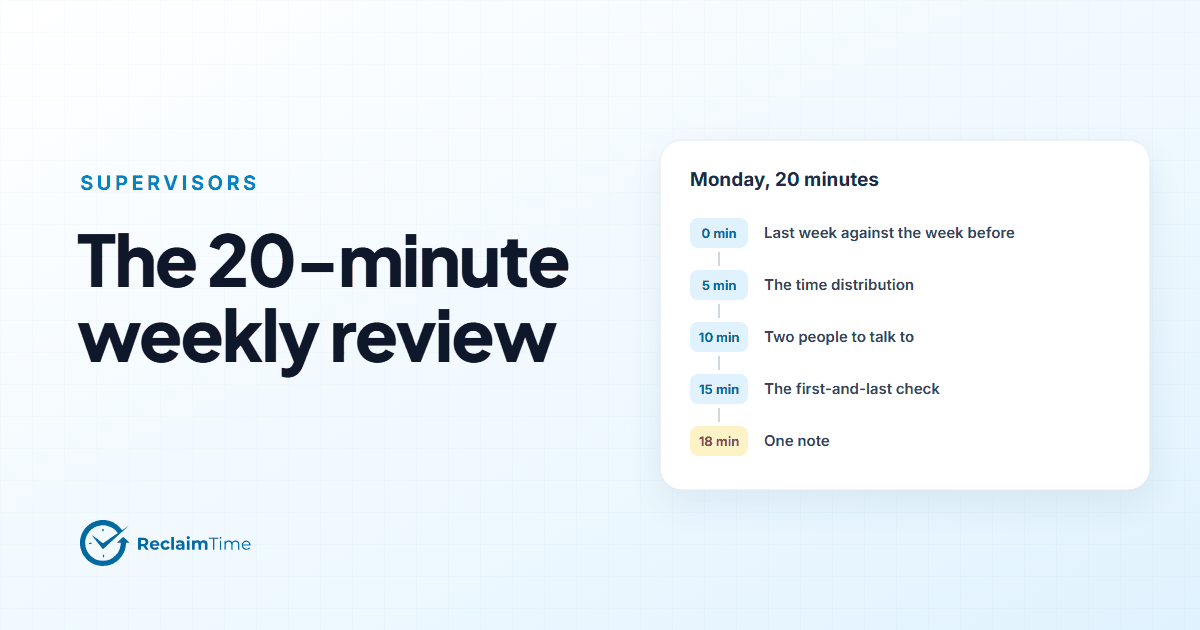
Minute 0 to 5: last week against the week before
Open the statistics page, set the group to your team and the range to last week, Monday to Friday, working hours. Note the three headline figures: average active time, average meeting time, average total time per person. Now set the range to the week before and compare.
You are looking for movement, not for a target. A team whose active time fell by an hour a day has had a week with something in it: a system outage, a training day, a holiday, a bad rota. You will usually know what it was. If you do not, that is the first thing to find out, and it will take you thirty seconds to ask.
Do not compare your team's figure to another team's. Different jobs have different shapes. The comparison that is fair is your team against itself.
Minute 5 to 10: the time distribution
Switch to the time distribution view for last week. This is the list of applications and sites, biggest first.
The top three will be what you expect: the CRM, the telephony client, Teams, in some order. Look at positions four to eight. That is where the week's story usually is.
Ask two questions of anything in that band:
Should this be here? A spreadsheet in fourth place in a team that is not supposed to use spreadsheets is a workaround for a tool that is not doing its job. A knowledge base in fifth place in a team of experienced agents is a sign that something changed in the product or the process. Neither is a people problem.
Was it here last week? A new entry in the top eight is a change. Find out what caused it. A new entry that is a corporate tool you forgot to add to the corporate list is the most common cause, and the fix is one row in the list.
The anonymous non-corporate block appears as a single line in this view. Note its share and whether it moved. If it jumped, the question is "what changed in the environment" before it is anything else.
Minute 10 to 15: the two people you will talk to
Now the per-person view, for last week, your group only, and only for corporate applications, because that is what the data is for.
You are not ranking. You are looking for two things.
Someone whose shape changed. A person whose time in the CRM halved while their time in the knowledge base doubled is a person who hit something they did not know how to do. That is a coaching conversation, and a welcome one: "I noticed you spent a lot of time in the KB last week, what were you looking for?" is a question people are glad to be asked.
Someone who is carrying meeting load. A person with far more meeting time than the rest of the team is either in a role that needs it or is being pulled into things that are not their job. Either way it is worth knowing, and worth asking about.
Two conversations. Not five, not everyone. Twenty minutes does not stretch further than that, and more than two a week starts to feel like monitoring rather than management.
Minute 15 to 18: the first-and-last check
The activity page lists first and last activity per person for the period. Scan it for the two patterns that matter:
- someone whose first activity is routinely late or last activity routinely early relative to their shift, which is a rota or an equipment conversation before it is anything else;
- someone with no activity on a day you expected them in, which is either absence you did not know about or a machine that is not signing in, and the Versions page will tell you which.
That is it. Do not read anything else into this page.
Minute 18 to 20: one note
Write three lines in whatever you keep notes in: the headline movement and its cause, the one thing in positions four to eight that you are going to follow up, and the two conversations. Next Monday, read last week's three lines before you start. Over a quarter those notes are the most useful management record you will have, and they will have taken you two minutes a week.
What this routine deliberately leaves out
No league table. The per-person view is for spotting a change in one person's week, not for ordering people. A supervisor who ranks their team by active time will get a team that is good at being active, which is not the same as a team that is good.
No productivity score. There is not one in the product, and the routine does not need one. "Time in the tools of the job, by team, week on week" is a measurement. A score is a judgment, and judgments belong to the supervisor.
No reading of individual titles. Window titles are in the data because they make the time distribution explainable at team level. Reading one person's titles line by line is a different activity, and it is not this one.
No action on a single week. One week is weather. Three weeks is climate. The routine is weekly so that the three-week pattern becomes visible, not so that you act on every Monday's number.
The supervisor guide in the documentation covers the pages this routine uses, and the one-page PDF there is a reasonable thing to print and keep next to the coffee.
See this on your own teams
Start with a pilot group and see the first team reports within a week. A reply comes within one business day.