Running one productivity policy across sites in different time zones
Per-person working hours, a group tree organized by site, time zone filters in reporting, and a corporate list that is shared. How a multi-country operation keeps one policy without flattening the differences.
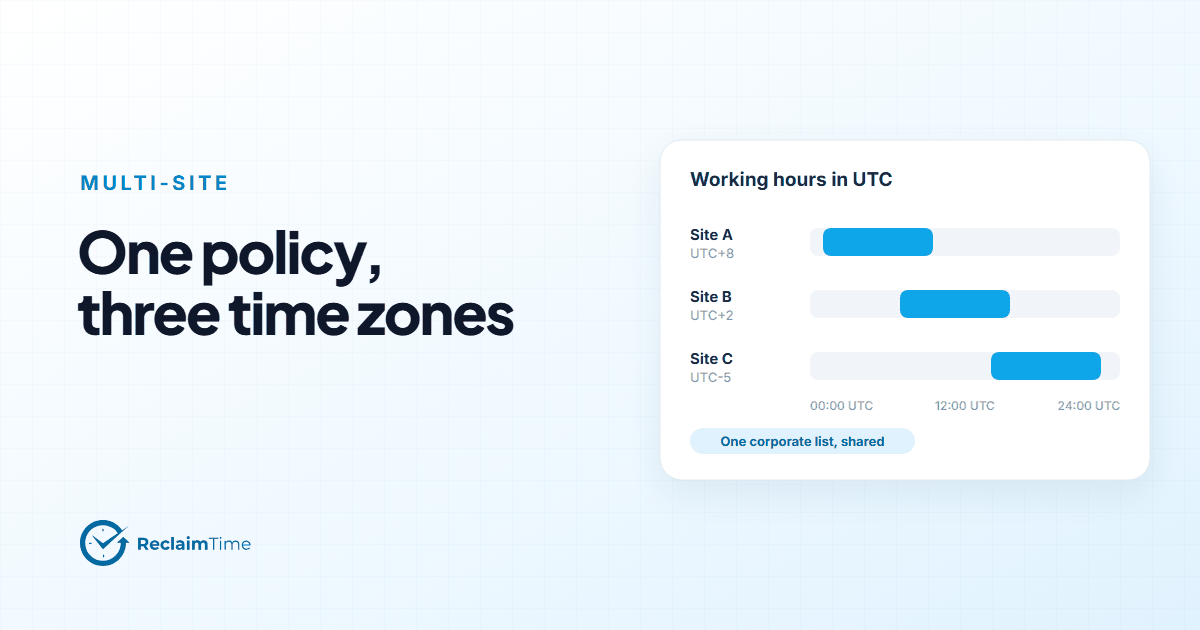
A multi-site operation wants one policy, because one policy is explainable and fair. It also has three sites in three time zones, with different shift patterns, different local rules on monitoring, and a works council in one of them. "One policy" cannot mean "one configuration," or the site in the wrong time zone gets nothing recorded during its actual working day.
Here is how to structure it so that the policy is one thing and the configuration follows the sites.
Working hours are the first thing to get right
Nothing is recorded outside the configured working days and hours. That is the privacy boundary, and it is also the thing that silently breaks a multi-site rollout if it is set once, centrally, in head office's time zone.
The organization has default working days and hours. A person can have their own. The practical pattern for multiple sites is:
- set the organization default to the pattern of the largest site, and set the organization time zone deliberately, because every page and export shows times in it;
- for each other site, set working hours per person to that site's pattern;
- for shift workers whose pattern varies, set the widest window that covers the shifts, and accept that the boundary is "shift could be happening" rather than "shift is happening."
Then check the first week's data for each site against that site's clock. The failure mode to look for: a site whose active time per person looks implausibly low, or whose day appears to start hours early. Nine times out of ten it is working hours expressed in another site's clock.
The group tree is the policy's map
Groups in ReclaimTime form a tree, up to six levels deep, and a supervisor sees their own group and everything under it. For a multi-site operation the natural top level is the site, then the department or client program within the site, then the team.
Organization
  Site A
    Program 1
      Team 1a
      Team 1b
    Program 2
  Site B
    Program 1
      Team 1c
  Site C
    ...
This does two things at once. It gives the site manager a single view of their site, and it lets the operations director compare sites at the level of a site, which is the level at which comparison is fair.
A program manager who runs the same program on two sites is the one case the tree cannot serve directly: a supervisor account is scoped to a single group and everything below it, so either put programs above sites in the tree or scope that manager to the nearest common parent. Decide which before the tree is built, because moving groups later is possible but tedious.
If one site's agreement limits who may see per-person figures, that is a question of which people are given supervisor accounts, not of where in the tree they sit. A supervisor sees per-person figures for everything beneath their group.
One corporate list, shared
The corporate list, which decides what is recorded by name and what is anonymized, is set at the organization level. That is deliberate. "What counts as work" should be the same answer across sites running the same programs, and a shared list is what makes the cross-site comparison meaningful.
Sites do differ in tooling, so the list ends up being the union: the CRM used in Site A and the different CRM used in Site B are both on it. That is fine. A tool that is on the list but not used at a site simply records no time there.
What should not happen is one site maintaining a private list. The moment that happens, a lower non-corporate share at that site means "they listed more things," not "they drift less," and the comparison is broken.
Plans follow the tree, not the site
If the operation uses focus plans at all (most do not; this post explains when they earn their place), plans are assigned to groups. So a nesting plan is assigned to each site's nesting group, and it is the same plan, and a change to it changes all three sites. A site-specific plan, say for shop-floor machines at one site, is assigned to that site's group only.
The rule that keeps this manageable: a plan should be assigned at the highest level of the tree where everyone below it should have it, and nowhere else. Plans on individual teams drift.
Reporting across time zones
The statistics page has a time zone filter. Use it deliberately.
For a site manager, the site's local time zone is the right view: the day looks like their day.
For a cross-site comparison, pick one zone and keep it, or compare per-person daily totals, which do not depend on the zone at all. What you want to avoid is comparing Site A's 9-to-5 against Site C's 9-to-5 in Site A's clock, which is Site C's night.
For a program manager running the same client program on two sites, per-person averages over a full week are the fair comparison. Hourly shapes will differ because the shifts do; weekly totals per head should not, and if they do, that is the finding.
Update channels per site
A detail that matters more for multi-site than it looks: an organization can have a dedicated update channel, so a new client version reaches its machines only when it has been published to that channel. For an operation where a disruption at one site is manageable and a disruption at all three is a bad day, ask on day one whether a pilot sub-channel for one site can be arranged. The Versions page shows which machines are on which version, by person and group.
The policy document, in one page
Write the one policy as a page, and keep it to a page: what is recorded, when (working hours, in local time), what is anonymized (everything not on the shared corporate list), who sees what (the tree), how long it is kept, and who to ask. Then let the configuration in the dashboard be the implementation of that page, site by site, rather than a second policy.
When a new site opens, the checklist is: working hours in local time, a site group with its programs and teams under it, supervisors assigned at the agreed level, the same corporate list, the same plans at the same level of the tree, and the update channel arrangement. That is a morning's work, and the new site's first week of data will be comparable to the others from the start.
The groups and hierarchy and settings pages in the documentation have the mechanics for each step.
See this on your own teams
Start with a pilot group and see the first team reports within a week. A reply comes within one business day.